Windows Server 8 Member Server - ADAC Recycle Bin

One nice thing is that some of the new features can easily run on a member server or workstation and work fine in your current domains.  You don't need to convince anyone about a schema update or new Windows 8 Domain Controllers right now.  Enjoy the new features with no risk (I'd argue there is not a lot of risk in adding a domain controller but I understand leadership wanting to wait on domain controllers)

One of those features is the AD Recycle Bin GUI. That is a nice addition that system administrators have been asking for since 2008 R2 was released. Your forest does have to be at 2008 R2 Forest Functional Level to enable the recycle bin.

Many people enabled and used the AD Recycle Bin in 2008 R2  There are even some 3rd party tools that can help and put a GUI front end around the Recycle Bin. In my opinion the GUI in Windows Server 8 is much nicer and is definitely a reason to add a Windows Server 8 member server now.

In my lab I have a 2008 R2 (forest functional level 2008 R2) Domain Controller and a Windows Server 8 Beta member server.


Windows 2008 R2 Domain


SIDE NOTE: As you can see my test domain is named USMCThanksForYourService.mil I've heard there might be some Marines stationed in Afghanistan reading this entry so a heartfelt thanks for all you all do. It takes a lot of courage to be in the military right now and you all are on the front lines. THANK YOU!!


SIDE NOTE II:  Although I'm an Army vet I support all branches of the military.  Any other military members reading my blog?  Leave a comment, I'd love to hear from you.

So people don't think I'm cheating I'll first verify that the Recycle Bin is not enabled by using the powershell command Get-ADOptionalFeature -Filter {name -like "*Recycle Bin*"} If EnabledScopes is empty that indicates the Recycle Bin has not been enabled.
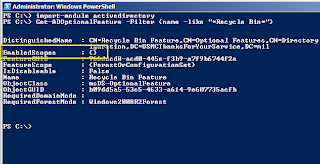

AD Recycle Bin not enabled

I also join the Windows Server 8 Beta machine to the domain.
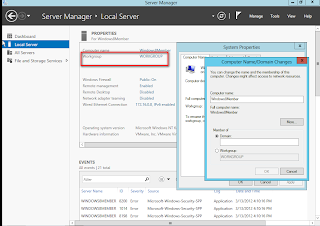

Adding Windows 8 Server to the domain


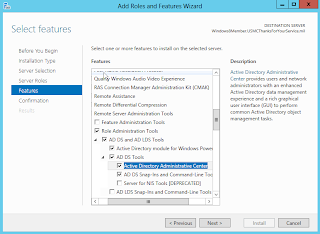
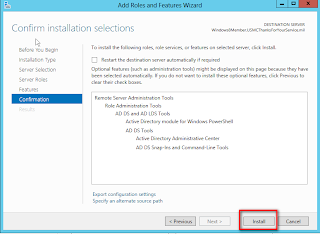
Once the server is added to the USMCThanksForYourService.mil domain I have to install the Remote Server Administration Tools (RSAT) Feature for Active Directory so I can have access to the necessary AD tools and fetures.
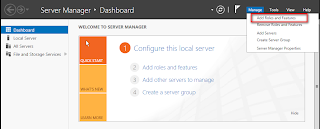

Adding Roles and Features in Server Manager


Adding RSAT Features


Adding RSAT Features Part II


Once the RSAT tools have been installed you are ready to use Active Directory Administrative Center (ADAC) against your 2008 R2 domain.

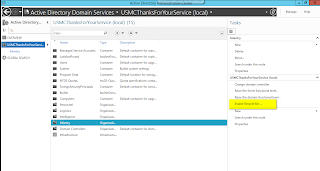
You can enable the AD Recycle Bin from the GUI now instead of the old way using Powershell 
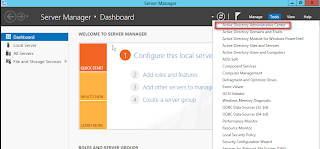


Selecting ADAC from Server Manager in Windows 8


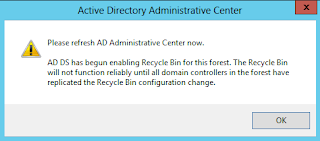
Enabling the AD Recycle Bin from Windows Server 8 Member Server ADAC

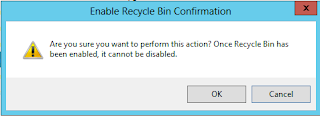
AD Recycle Bin Confirmation 1

AD Recycle Bin Confirmation 2


Just want to confirm that the AD Recycle Bin has been enabled.  Notice this time the same command yielded an entry in "EnabledScopes"...success
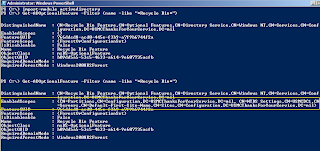
AD Recycle Bin Enabled - Confirmation
 A quick tutorial of the new feature now that it is enabled and the member server is up and ready to go.

As you can see there is a user named Dakota Meyer who is in the group "MedalofHonor"


A young contractor was really excited and lost his mind and accidentally deleted the account.   Luckily the USMC leadership had allowed this Windows 8 Member Server and Dakota's account would be restored in a few clicks.
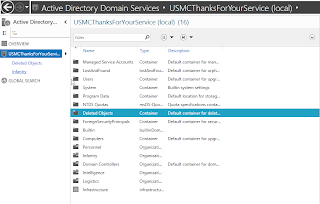

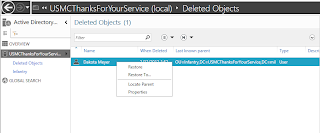
In ADAC Navigate to the Deleted Objects Container


Notice the deleted user is listed.  Right click on the user for Restore Options


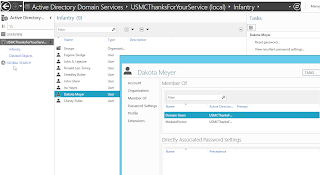
In ADAC we confirm that the user has been successfully restored
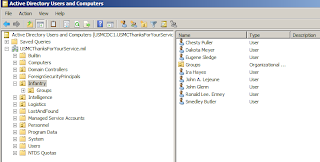


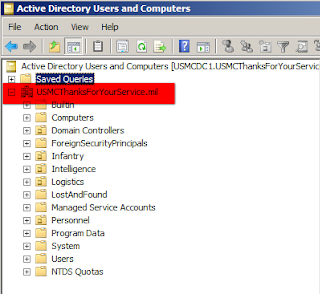
On the 2008 R2 DC the restore is confirmed using ADUC


Speed up Internet Explorer

By default Internet Explorer does not allow more than 4 or 2 simultaneous sessions (HTTP 1.0/1.1) from the same source. You can, however, override this setting by adding few registry keys.
Execute the following two commands to add the required values.
  • REG ADD "HKEY_CURRENT_USER\Software\Microsoft\Windows\CurrentVersion\Internet Settings" /v MaxConnectionsPer1_0Server /t REG_DWORD /d 20
  • REG ADD "HKEY_CURRENT_USER\Software\Microsoft\Windows\CurrentVersion\Internet Settings" /v MaxConnectionsPerServer /t REG_DWORD /d 20

How To Recover Local Administrator Password

There are plenty of tools available on the net - commercial as well as free, which can be used for resetting/recovering the local administrator password, but this time when I ran into the issue, none that we used to have, worked. A user's machine running Windows 2003 Standard Edition was out of domain, and later we realized that the local administrator's password was already changed from the default one. Obviously user wasn't able to recall that password. Since the machine was also running the development environment, user requested not to reformat/reimage.
For these kind of scenarios, we almost always used Offline NT Password and Registry Editor http://home.eunet.no/~pnordahl/ntpasswd/, but for some reason, this utility failed to reset the password on this machine. I would assume, it failed because of the Windows OS architectural changes incorporated in XP SP2/W2K SP1.
While looking for an alternative I came across www.loginrecovery.com which offers a free bootable downloadable CD image of about 1.5 MB. Once booted, this utility shows all the local user accounts and their corresponding password hashes. According to the website, you are supposed to note down these hashes are they are displayed on the screen, in a text file and upload that file on their website. They take 2-3 days to revert with the password for free, and charge few dollars for immediate delivery.
Not willing to pay or wait for 2-3 days, I went ahead and started searching for free programs which can crack given MD5/LM/NTLM hashes, and came across MDCrack http://c3rb3r.openwall.net/mdcrack/. At first this utility crashed when I tried running on my XP with SP2 system. I had to set compatibility mode of this program to Windows 2000 to be able to run it successfully. Using the password hashes noted above in this program, chose appropriate algorithm (Algorithm - MD5/MD4/NTLM1), and let the program run brute force algorithm to decode the password.

How To Recover Local Administrator Password

There are plenty of tools available on the net - commercial as well as free, which can be used for resetting/recovering the local administrator password, but this time when I ran into the issue, none that we used to have, worked. A user's machine running Windows 2003 Standard Edition was out of domain, and later we realized that the local administrator's password was already changed from the default one. Obviously user wasn't able to recall that password. Since the machine was also running the development environment, user requested not to reformat/reimage.
For these kind of scenarios, we almost always used Offline NT Password and Registry Editor http://home.eunet.no/~pnordahl/ntpasswd/, but for some reason, this utility failed to reset the password on this machine. I would assume, it failed because of the Windows OS architectural changes incorporated in XP SP2/W2K SP1.
While looking for an alternative I came across www.loginrecovery.com which offers a free bootable downloadable CD image of about 1.5 MB. Once booted, this utility shows all the local user accounts and their corresponding password hashes. According to the website, you are supposed to note down these hashes are they are displayed on the screen, in a text file and upload that file on their website. They take 2-3 days to revert with the password for free, and charge few dollars for immediate delivery.
Not willing to pay or wait for 2-3 days, I went ahead and started searching for free programs which can crack given MD5/LM/NTLM hashes, and came across MDCrack http://c3rb3r.openwall.net/mdcrack/. At first this utility crashed when I tried running on my XP with SP2 system. I had to set compatibility mode of this program to Windows 2000 to be able to run it successfully. Using the password hashes noted above in this program, chose appropriate algorithm (Algorithm - MD5/MD4/NTLM1), and let the program run brute force algorithm to decode the password.

How To Recover Local Administrator Password

There are plenty of tools available on the net - commercial as well as free, which can be used for resetting/recovering the local administrator password, but this time when I ran into the issue, none that we used to have, worked. A user's machine running Windows 2003 Standard Edition was out of domain, and later we realized that the local administrator's password was already changed from the default one. Obviously user wasn't able to recall that password. Since the machine was also running the development environment, user requested not to reformat/reimage.
For these kind of scenarios, we almost always used Offline NT Password and Registry Editorhttp://home.eunet.no/~pnordahl/ntpasswd/, but for some reason, this utility failed to reset the password on this machine. I would assume, it failed because of the Windows OS architectural changes incorporated in XP SP2/W2K SP1.
While looking for an alternative I came across www.loginrecovery.com which offers a free bootable downloadable CD image of about 1.5 MB. Once booted, this utility shows all the local user accounts and their corresponding password hashes. According to the website, you are supposed to note down these hashes are they are displayed on the screen, in a text file and upload that file on their website. They take 2-3 days to revert with the password for free, and charge few dollars for immediate delivery.
Not willing to pay or wait for 2-3 days, I went ahead and started searching for free programs which can crack given MD5/LM/NTLM hashes, and came across MDCrack http://c3rb3r.openwall.net/mdcrack/. At first this utility crashed when I tried running on my XP with SP2 system. I had to set compatibility mode of this program to Windows 2000 to be able to run it successfully. Using the password hashes noted above in this program, chose appropriate algorithm (Algorithm - MD5/MD4/NTLM1), and let the program run brute force algorithm to decode the password.